Appearance
Release 0.4.2 beta
Release date: 12/12/2025
This is the third client release of Cenova December 2025.
Introduction and Overview
Thank you for installing the latest version of Cenova, our data management and project monitoring suite. The 0.4.2-beta release introduces the ability to configure a database location as well as functional improvements and bug fixes to enhance user experience.
Since its initial rollout, Cenova has been adopted across multiple teams to support efficient crawling, duplication detection, and application tracking.
We encourage you to explore the new capabilities and continue sharing your feedback via our support channels at support.geo@cegal.com or blueback.zendesk.com\home. Your input helps shape the future of Cenova.
New Features ✨
Set the location of the Crawler index and project databases
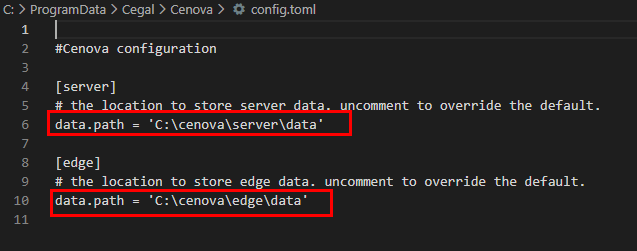
The system administrator can now set the location of edge and server index files which can be large in size.
This feature has been introduced to allow for override of the default locations in the C drive Program Date directory if there are size restrictions for this folder.
WARNING
These locations should still be physical disks attached to the machine. Network locations are not recommended for performance and reliability reasons.
The location can be edited in the C:\ProgramData\Cegal\Cenova\config.toml file
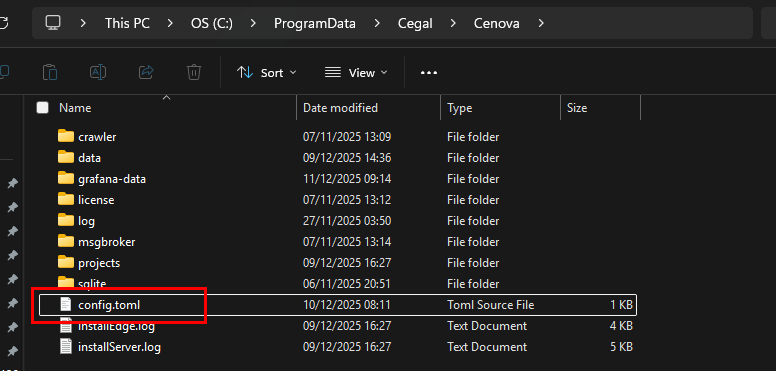
The user can set a new path as long as the user running Cenova services has Read/Write access to the location.
NOTE
The Windows services for the Cenova Server and Cenova Edge services should be restarted for changes to config.toml file to take effect.
Improvements 🔧
76046 Turn on follow mount points by default.
If a system contains mount points within fileshares, Cenova will now follow these by default, ensuring better coverage of crawling.
76047 Follow mount points and -at on by default
The flags for mount points and -at (additional time information) have been turned on by default for the crawler.
Bug Fixes 🐞
77673 Follow mount points not working
78000 Seeing a "context deadline exceeded" on opening of dashboard
The timeout of the queries has been increased
Known issues ❗
Multiple filters not working in Application and Subsurface data search